Data Equivariance#
The networks implemented in DeepH-pack are equivariant networks, which strictly follow the piror knowledge that the physical properties transform equivariantly under spatial translations and rotations. For example, the DFT Hamiltonian sub-blocks satisfy
On the other hand, the data (e.g., Hamiltonians and density matrices) generated by the DFT programs may slightly break the equivariance rule because of the discrete real-space mesh used in the programs. Obviously, the equivariance error is part of the unphysical noise of the training data, which is the lower bound of the training loss of the neural network. Therefore, to properly train and evaluate a DeepH model, it is crucial to keep the equivariance error of the data below the expression error of the model. DeepH-dock provides a tool-chain to systematically test the data equivariance.
Structure generation#
The First step to test the data’s equivariance is to generate a group of structures that differ from each other only by translations and rotations. The user can use the terminal tool to generate randomly translated and rotated structures from a given initial POSCAR file.
The command and the description of the arguments are shown below.
dock analyze dft-equiv gen -h
Usage: dock analyze dft-equiv gen [OPTIONS] POSCAR_DIR

  Generate transformed structures for equivariance testing

Options:
  -n, --generate-num INTEGER RANGE
                                  The number of translated and rotated structures.  [default: 64; 1<=x<=1024]
  -r, --rot-mode [0|1|2|3]        Rotation mode: 0 - no rotation, 1 - rotate coordinates only, 2 - rotate lattice only, 3 - both rotate coordinates and lattice. [default: 1]
  --translate                     Translate the structure.
  --move-to-origin                Move the mass center to origin.
  --dump-decimals INTEGER         The decimals of coordinates and lattice when dumping, -1 for no rounding.  [default: -1]
  -h, --help                      Show this message and exit.
The initial structure must be placed as <POSCAR_DIR>/0/POSCAR and other structures will be dumped as <POSCAR_DIR>/[1-n]/POSCAR.
Please be careful of the rot-mode argument. Mode 0 denotes no rotation and is used for translational equiviance test. For periodic systems, only mode 3 is allowed for rotational equiviance test. For cluster systems with regular real space mesh (e.g., OpenMX, SIESTA, etc), only mode 1 and 2 are meaningful for rotational equiviance test. For cluster systems with atomic-centered mesh (e.g., FHI-aims), only mode 1 and 3 are meaningful for rotational equiviance test.
Example:
dock analyze dft-equiv gen ./poscars -n 4 --translate
ls -1 ./poscars/*/POSCAR
100%|███████████████████████████████████████████| 3/3 [00:00<00:00, 1219.16it/s]
./poscars/0/POSCAR
./poscars/1/POSCAR
./poscars/2/POSCAR
./poscars/3/POSCAR
DFT calculation#
Run the DFT calculations for all the structures and transform the results to the standard file format of DeepH-pack. The result of each structure should be placed under the same directory as the POSCAR file. This needs to be done by the user.
Equivariance check#
DeepH-dock provides the terminal tool to check the equivariance error of the results. The Hamiltonians are first rotated back to align with the original structure (\(D^{\dagger}_{(R_i)}H_{(\mathcal{R}_i)}D_{(R_i)}\)) and then the root mean square error (RMSE) is calculated, where \(\mathcal{R}_i\) denotes \(i\)-th structure, \(R_i\) denotes the rotation of \(i\)-th structure (\(\mathcal{R}_i=R_i\mathcal{R}_\text{0}\)), and \(D_{(R_i)}\) denotes the Wigner-D matrix related to \(R_i\).
In most of the Hamiltonian training cases, the equivariance error of data needs to be lower than 0.1meV, and an error of 0.01~0.05meV is recommended.
The command and the description of the arguments are shown below.
dock analyze dft-equiv test -h
Usage: dock analyze dft-equiv test [OPTIONS] POSCAR_DIR

  Test data equivariance with translated and rotated structures

Options:
  -t, --target TEXT               The file name for test, <target>.h5.  [default: hamiltonian]
  -R, --cell-index <INTEGER INTEGER INTEGER>...
                                  The selected cell index for test.  [default: 0, 0, 0]
  -P, --atom-pair <INTEGER INTEGER>...
                                  The selected atom pair for test, (-1, -1) for all atom pairs.  [default: -1, -1]
  -h, --help                      Show this message and exit.
Example:
dock analyze dft-equiv test ./dft_calc.bak
[do] analyzing ...
100%|█████████████████████████████████████████████████| 5/5 [00:00<00:00, 53.70it/s]
[data] Mean absolute value of entries: 4.624965817517407
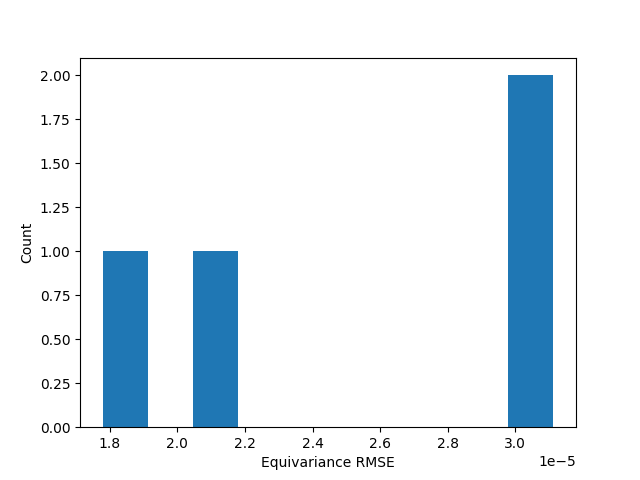
[data] Root mean square error (RMSE) of entries: 2.512059908130085e-05
[note] For Hamiltonian matrix, a RMSE below 1e-4 eV is preferred.